PersModule
The Manual
Introduction
_G.PersModule
OOP modules
Core
Clients
MFM
mouseFollow
seatSystems
controllerModule
turretSystems
mouseController
smoothSailor
riggerModule
utils
downloader
printFormat
weapons
handleAA
ships
health
wakeSystem
WakeHandler
gWC
radar
init

Back to top
Introduction
PersModule is a private Luau library maintained by thepersonone134. The library is a collection of general purpose and specialised modules which control all aspects of gameplay. This documentation is for developers that are using PersModule in their own creations. It is forbidden that this document is used to find exploits, or for used to reverse engineer PersModule. To use this document, you must already have had explicit permission granted by thepersonone134.
The stance on theft
Not only is it dangerous to use an externally distributed version of PersModule as it may contain unpatched vulnerabilities, but it is likely that a non-centralised copy that does not go through Roblox's toolbox script scanning will contain malicious code that could cause Roblox to take action against your account. In the case that it is discovered that you do have a stolen version of PersModule that was not distributed by thepersonone134 (without explicit concurrent or continuing permission - including after a change of ownership of a Roblox experience), do expect a DMCA takedown request to be issued.
Those using a leaked or stolen PersModule copy are advised against utilising this document. It is likely that an older version of PersModule will not be as relevant to this documentation since many changes to the source-code have occurred since PersModule's inception.
Statement
PersModule integration requires a good baseline of knowledge in programming. The modules in the library do not infer information from your arguments. Any questions relating to this documentation should be passed onto thepersonone134.
Organisation of this document
This document has been split between the core ideas of PersModule and PersModule's modules. After "The Manual", the titles of each category are the names of the folders which contain the modules.
Most sub-categories in "The Manual" express key ideas however, "Core" is documentation for a group of critical and general modules nicknamed "Core Modules".
_G.PersModule
For ease of access, PersModule is stored as a global variable on the server.
Initiation
Before PersModule can be stored as a global variable, it must be initialised by a server script.
local pathToLibrary = game.ServerStorage:WaitForChild("PersModule")
local assetManagerModules = require(pathToLibrary:WaitForChild("assetManager"))

assetManager.initPersModule()
print(_G.PersModule) -- Prints all of the PersModule library functions
PersModule's modules are only accessible on the server. Aforementioned code must be ran in a server script.
The functions within _G.PersModule
The PersModule global variable is formatted so that the modules inherit the name of their parent folder.
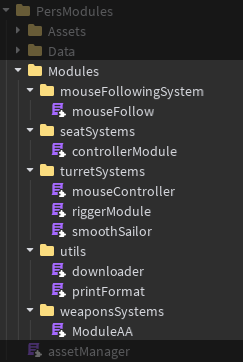
_G.PersModule will compile the modules as:
mouseFollow functions would be listed under mouseFollowingSystem
controllerModule functions would be listed under seatSystems
mouseController functions would be listed under turretSystems
riggerModule functions would be listed under turretSystems
smoothSailor functions would be listed under turretSystems
downloader functions would be listed under utils
printFormat functions would be listed under utils
et cetera, this pattern of child modules inheriting their parent's name when formatted into _G.PersModule will continue - even for new modules added after this documentation is written.
Using _G.PersModule
repeat task.wait() until _G.PersModule -- Yield until PersModule is available
local PersModule = _G.PersModule
PersModule.utils.beautifulPrint({
    "I",
    "Goon",
    "To",
    "Blue",
    "Archive",
})
-- Function beautifulPrint from utils's printFormat module has inherited the folder name "utils"
Aforementioned code must be ran in a server script.
Object Oriented Programming
OOP OOP OOP OOP OOP OOP OOP OOP
This module should not be accessed from the global variable.
This sub-category is a recommended read for modules marked with "Object Oriented Programming" - using the default copy of PersModule via _G.PersModule is not acceptable.
Why are OOP modules treated differently?
Instance references such as "self" are attached to the instance of the module. _G.PersModule provides a central and single copy of a module for use across scripts across the entirety of the workspace. If multiple scripts call and use the same copy of the OOP module, there may be conflicts.
Creating new instances of a module to facilitate OOP is being phased out. All new modules that require OOP will be written in the traditional module.new() OOP format.
Handling OOP modules
repeat task.wait() until _G.PersModule -- Yield until PersModule is loaded
local PersModule = _G.PersModule
local seatSystems = PersModule.utils.requireModule("controllerModule","seatSystems") -- say for instance we want the controller module
print(seatSystems == PersModule.seatSystems) -- false, because we have a new instance of the module!
An example of how you might want to do this - for more information view utils >> downloader >> methods >> module.requireModule
Core Modules
PersModule's Core modules are protected, and have large impacts on user experience. Core module documentation may be lacking in this document due to security risks, compounded with the fact that they are likely exclusively used internally.
MeFRegH Core Module
Core method in the Motor6D replication process - the majority of the documentation has been deliberately omitted to discourage harmful manipulation.
Core.reg_gen ()
Returns a unique version 4 GUID.
WCPPoO Core Module
This module handles object pooling.
Core.srs_req_addto_tables (InstanceToPool: Instance)
Defines a memory location in the internal dictionary system. This method call is mostly redundant as it is done automatically using Core.srs_req_downloadto_table(...) with ForceAddToMemory as true.
Core.srs_req_downloadto_table (InstanceToPool: Instance, QuantityToPool: number?, ForceAddToMemory: boolean?)
Pools either one instance, or the quantity of instances defined. ForceAddToMemory as true does the same thing as Core.srs_req_addto_tables()
Core.srs_req_pullderivedfrom_table (InstanceToPool: Instance)
Removes an instance from the pool and returns it. If there are no items left in the pool, it will create a new instance.
Core.srs_req_returnderivedfrom_table (InstanceToPool: Instance, InstanceToReturn: Instance)
Returns an item to the pool. If the item was never in the pool a warning will be outputted, and the item will be deleted.
Core.srs_req_removenum_table (InstanceToPool: Instance, ForceRemoveInstances: {}, InitialQuantityToPool: number)
Removes pooled items from pooling system, and from system memory.
PersModule and clients
Usually, PersModule is never available on the client - because there would be no good reason to, right? Well, having a turret movement system on the client could make the turret more responsive, sooo... why won't we?
repeat task.wait() until _G.PersModule -- Yield until PersModule is loaded
local PersModule = _G.PersModule

PersModule.utils.requireModuleClientSide("mouseFollow", player, { -- say for instance we want the mouseFollow module on the client
    ["origin"] = "mouseFollowingSystem"
})

-- client now has access to the module
An example of how you might want to do this - for more information view utils >> downloader >> methods >> module.requireModuleClientSide
_G.PersModule formatting on the Client
Due to the fact that we are requiring only one module on the Client, and not the entirety of PersModule, the name of the module's parent folder on the server is not easily available on the client. Therefore in the client's version of the PersModule global variable, the module's functions are listed under the module's name.
repeat task.wait() until _G.PersModule -- Yield until PersModule is loaded
local PersModule = _G.PersModule

PersModule.mouseFollow.handleTraverse(targetCFrame, motor6d, root, traverse)
-- For example, mouseFollow, a module which is commonly replicated to the client.
An example of how you would use PersModule's mouseFollow on the client.
MouseFollow Module
OOP OOP OOP OOP OOP OOP OOP OOP
This module should not be accessed from the global variable.
This module handles the CFrame of Motor6Ds in relation to the location of the mouse. MouseFollow was created to replace the deprecated the module pair: smoothSailor and mouseController.
Methods
module.handleTraverse (targetCFrame: CFrame, motor6d: Motor6D, root: Part, traverse: boolean, args: {traverseSpeed: number?, limits: {}?, isGunReRigged: boolean?, manipulate: boolean?})
Calculates the required amount to manipulate the traverse or elevation Motor6D and internally creates a smoothing solution.
module.forceCancelTween (motor6d: Motor6D)
Forces the cancellation of the tweens in a Motor6D. Useful for when you do not have access to the module instance that was used to call handleTraverse originally.
module.cancelTraverse ()
Forces the cancellation of all tweens associated with the module instance which called handleTraverse originally.
ControllerModule
OOP OOP OOP OOP OOP OOP OOP OOP
This module should not be accessed from the global variable.
Module tracks when a player sits in a seat, and when they leave. Optional arguments allow for GUI and LocalScripts to be distributed when a player sits, and for it to be removed when a player stands up.
Please use Seats and not VehicleSeats.
Methods
module:handleInteraction ()
Handles the interaction between the player and the Seat or ProximityPrompt. This method will have connections active until the player has exited the weapon.
module:initInteraction (proximityPrompt:ProximityPrompt, model: Model | Folder, player:Player, requestedDeleted: {}, resetters: {}, returnEvent: BindableEvent, PersModuleInstance: Instance, options: {upAmount: number?, seat: Seat? | VehicleSeat?})
Sends all information required to the module for the interaction to be handled. Proximity prompt parameter can be left as nil - it is shown as mandatory in the parameter list as it is adapted from a deprecated (and removed) module.
If options["seat"] is not provided, PersModule will infer the model's primary seat - please provide the options["seat"] if your model has more than one seat.
MouseController

DEPRECATED DEPRECATED DEPRECATED DEPRECATED DEPRECATED DEPRECATED DEPRECATED DEPRECATED DEPRECATED
Superceded by mouseFollow. This module is deprecated and should not be utilised for new work.
Legacy module which used dot products to coarsely move a turret mounting towards the mouse.
Methods
module.loadTraverseSys (targetCFrame: CFrame, motor6d: Motor6D, root: Part, traverse: boolean, speed: number, limits: {}, extraArgs: {isGunReRigged: boolean?}?)
Manipulates the traverse or elevation Motor6D.
SmoothSailor
DEPRECATED DEPRECATED DEPRECATED DEPRECATED DEPRECATED DEPRECATED DEPRECATED DEPRECATED DEPRECATED
Superceded by mouseFollow and riggerModule. This module is deprecated and should not be utilised for new work.
OOP OOP OOP OOP OOP OOP OOP OOP
This module should not be accessed from the global variable.
Legacy module which was intended to be used in tandem with legacy module "mouseController" to smooth the coarse movement.
Methods
module:initRigGun (part: Part, autoRigger: Script, position: string, kingRoot: Part?)
This method is deprecated and should not be used for new work - riggerModule does everything that this module used to do. Creates a temporary part, useful for stopping Motor6Ds from turning on an offset.
module:isGunReRigged ()
This is a deprecated method - use markedGunIsRigged instead. Returns whether a temporary part was created using smoothSailor. This method is not forward compatible with riggerModule.
module.markedGunIsRigged (requester: Script)
Changes the Motor6D which mouseController utilises.
RiggerModule
Colloquially recognised as "AutoRigger" - internally referred to as "rigger" to distinguish it from the original AutoRigger - which is still being used on the Anti-Air where PersModule is responsible.
Tickets
RiggerModule utilises a format of many tables as its arguments.
Beneath each method the unique ticket format will be shown. It is imperative that this format is followed - or your model will not be rigged correctly. riggerModule will always infer parameters - whether these interpretations are correct is up to how accurate your tickets are.
This is the only module in this library which actively infers parameters.
Methods
module.holdBodyModel (Model: Model)
Anchors the entire model.
module.releaseBodyModel (Model: Model, exempt: {}?)
Unanchors the entire model except those BaseParts which are passed through the exempt dictionary.
local exempt = {script.Parent.Mesh, script.Parent.Part, script.Parent.Union}An example which shows the expected format of the exempt parameter. riggerModule will not infer this parameter.
module.assembleWelds (tickets: {}, exclude: {})
Welds entire models or folders together using WeldConstraints.
local tickets = {
    {
        Cannon_Model, -- Model
        Weld_To, -- Part
        Weld_Parents, -- Any instance really
    },
    {
        Turret_Model, -- Model
        Weld_To, -- Part
        Weld_Parents, -- Any instance really
    },
}
An example which shows the expected format of the ticket.
local exempt = {script.Parent.Mesh, script.Parent.Part, script.Parent.Union}An example which shows the expected format of the exempt parameter. riggerModule will not infer this parameter.
module.assembleAltWelds (tickets:{})
Welds parts together using Welds.
local tickets = {
    ["Weld 1 Name"] = { -- Key name is the name of your Weld
        Part0, -- BasePart
        Part1, -- BasePart
        Weld_Parents, -- Any instance really
        CFrame.Angles(0,0,0) -- C1 offset (CFrame?)
    },
    ["Weld 2 Name"] = { -- Key name is the name of your Weld
        Part0, -- BasePart
        Part1, -- BasePart
        Weld_Parents, -- Any instance really
        CFrame.Angles(0,0,0) -- C1 offset (CFrame?)
    },
}
An example which shows the expected format of the ticket.
module.assembleMotor6D (tickets:{})
Creates a Motor6D between two parts.
local tickets = {
    ["Motor6D 1 Name"] = { -- Key name is the name of your Motor6D
        Part0, -- BasePart
        Part1, -- BasePart
        Motor6D_Parent, -- Any instance really
        CFrame.Angles(0,0,0) -- C1 offset (CFrame?)
    },
    ["Motor6D 2 Name"] = { -- Key name is the name of your Motor6D
        Part0, -- BasePart
        Part1, -- BasePart
        Motor6D_Parent, -- Any instance really
        CFrame.Angles(0,0,0) -- C1 offset (CFrame?)
    },
}
An example which shows the expected format of the ticket.
module.genTempPart (tickets:{})
Creates a temporary part, useful for stopping Motor6Ds from turning on an offset. This is akin to creating a new part to assist in manual Motor6D creation.
local tickets = {
    {
        PartToClone, -- BasePart
        Weld_Parents, -- Any instance really
    },
}
An example which shows the expected format of the ticket.
module.weldAllParts (model: Model | Folder, ctrlPart: Part, folder: Folder?)
Used for welding planes together.
Examples
repeat task.wait() until _G.PersModule
local PersModule = _G.PersModule
local constraints = Instance.new("Folder"); constraints.Parent = script.Parent

PersModule.turretSystems.holdBodyModel(script.Parent)

PersModule.turretSystems.genTempPart(
    {
        {
            script.Parent.Cannon.Root,
            script.Parent.Turret.TurretRing
        },
    }
)

PersModule.turretSystems.assembleWelds(
    {
        {   script.Parent.Cannon.Parts,
            script.Parent.Cannon.Root,
            constraints
        },
        {   script.Parent.Turret.Parts,
            script.Parent.Turret.TurretRing,
            constraints
        }
    },
    {
        script.Parent.Cannon.Parts.Barrel1,
        script.Parent.Cannon.Parts.Barrel2,
        script.Parent.Cannon.Parts.Barrel3
    }
)

PersModule.turretSystems.assembleAltWelds(
    {
        ["Barrel1"] = {
            script.Parent.Cannon.Root,
            script.Parent.Cannon.Parts.Barrel1,
            script.Parent.Cannon.Root
        },
        ["Barrel2"] = {
            script.Parent.Cannon.Root,
            script.Parent.Cannon.Parts.Barrel2,
            script.Parent.Cannon.Root
        },
        ["Barrel3"] = {
            script.Parent.Cannon.Root,
            script.Parent.Cannon.Parts.Barrel3,
            script.Parent.Cannon.Root
        },
    }
)

PersModule.turretSystems.assembleMotor6D(
    {
        ["Root"] = {
            script.Parent.Turret.TurretRing,
            script.Parent.Cannon.Root,
            script.Parent.Turret.TurretRing,
        },
        ["BaseMotor"] = {
            script.Parent.Base,
            script.Parent.Turret.TurretRing,
            script.Parent.Base,
        },
    }
)

PersModule.turretSystems.releaseBodyModel(script.Parent, {script.Parent.Base})
An example of a battleship turret being rigged by RiggerModule, in which the script is located in the root directory of the model.
repeat task.wait() until _G.PersModule
local PersModule = _G.PersModule
local constraints = Instance.new("Folder"); constraints.Parent = script.Parent

PersModule.turretSystems.weldAllParts(script.PlaneSystem, script.PlaneSystem.Root, Welds)
PersModule.turretSystems.weldAllParts(script.Body, script.Body.Root, Welds)
An example of a plane being rigged by RiggerModule, in which the script is located in the root directory of the model.
Downloader
Downloader is a utility module that is used to safely interact with PersModule's core and modules at runtime.
Methods
module.downloadAsset (assetName: string, origin: string?)
Used for shorthanding the cloning of assets from PersModule.
module.requireModule (assetName: string, origin: string?)
Used for creating new instances of modules so that OOP can take place.
module.requireModuleClientSide (assetName: string, player: Instance, args: {store: boolean?, origin: string?, soft: boolean?, attribute: string?})
Used for creating new instances of modules on the client. Cannot be called on client for obvious reasons.
PrintFormat
PrintFormat is a utility module that is used to quickly output data to both server and client in a multitude of formats.
Methods
module.beautifulPrint (TableToPrint: {})
Prints a table as it appears in the console
module.horrificWarnings (TableToPrint: {})
Prints a table as it appears in the console - except now it's all warnings.
module.communicateClientError (errormessage: string, player: Instance)
Communicates with the client to print a message.
handleAA
NEW NEW NEW NEW NEW NEW NEW NEW
This module was newly added to the PersModule library - it may have infastructure which differs from other modules.
Module which handles Anti-Aircraft weaponry's firing system.
Methods
module.new (Args: {Model: Model, FiringParts: number, Type: string, FirePartPrefix: string, FirePartContainer: Instance, FiringFrequency: number, Team: number})
Creates an instance of the module so that OOP can take place.
module.viewData ()
Returns all bullet, dispersion, velocity, gravity, and damage information about the bullet types.
module:reClassifyAAWeaponStatus (State: boolean?, OutCFrames: {}?)
Changes the state of the firing loop, and updates the CFrame information about the out parts.
module:maintainConnection (OutCFrames: {}?)
Updates the CFrame information about the out parts.
module:handleFire ()
Starts the firing loop.
Examples
repeat task.wait() until _G.PersModule
local PersModule = _G.PersModule

local WeaponInstance = PersModule.weapons.new( ... )
print(WeaponInstance.viewData())
An example of creating a new instance of the module, and printing the data about the bullet types.
init
Module which acts as a short-hand to interact with the Core Radar system.
Methods
module.register (Model: Model)
Sends a request to the Core Radar system. The Core Radar system will create a connection to all seats in the model, and will distribute a Radar interface to a player when they sit in any one of the seats in the model.
WakeManager
Module which acts as a short-hand to interact with the wake replication system.
Methods
module.req_replication (steer: number, root: Part, wakeparts: {})
Automatically sets up the ship for wake replication. Information passed through this method must be accurate or there is a good chance that all ship wakes will be bricked.
module.update_replication (steer: number, folder: Folder)
Updates the steering attribute of the wake replication object. This allows the front wake particle to rotate and spray water against the ship.
globalWakeController
A module which allows a convincing looking trail-based wake, using Roblox beams. Part pooling is handled by the WCPPoO Core Module.
Methods
module:registerWakeMaker (WakeMakerPart: BasePart, WakePart: BasePart, Args: {})
Returns the OOP instance
module:init ()
Creates a loop that checks, creates new beams if a threshold distance has been exceeded, and will also check old beams and make them "expire"
module:quit ()
Stops the loop caused in :init(). Required to maintain server performance and to prevent memory leaks. This method is mostly used internally, but can also be used externally. Please make sure what the hell you are doing when interacting with this.
health
Despite being called health, it actually just handles the lifetime of the ships that are binded to it.
Method that were not listed are internal methods and should not be interacted with externally. To add custom sinking animations, you should locate Sink in Assets and modify SpecialSinkingFunctions - for more information, contact Persi.
Methods
module.new (ShipModel: Model, Terminate: {}?, NoAntiCheat: boolean?)
Returns the OOP instance. Terminate are the events that you want disconnected after the ship sinks e.g globalWakeController via :quit(). NoAntiCheat should only be used if your ship uses more than three throttles or less than -1 throttles.
© 2026 thepersonone134